
 All posts

We just made major improvements to the Order Soon Nudge! Nudgify users can now set separate shipping conditions for each day of the week. Select which days you deliver and dispatch, and specify a cut-off time for each day. This way, you can create Urgency with an Order Soon Nudge that always shows an order deadline that matches your shipping conditions.
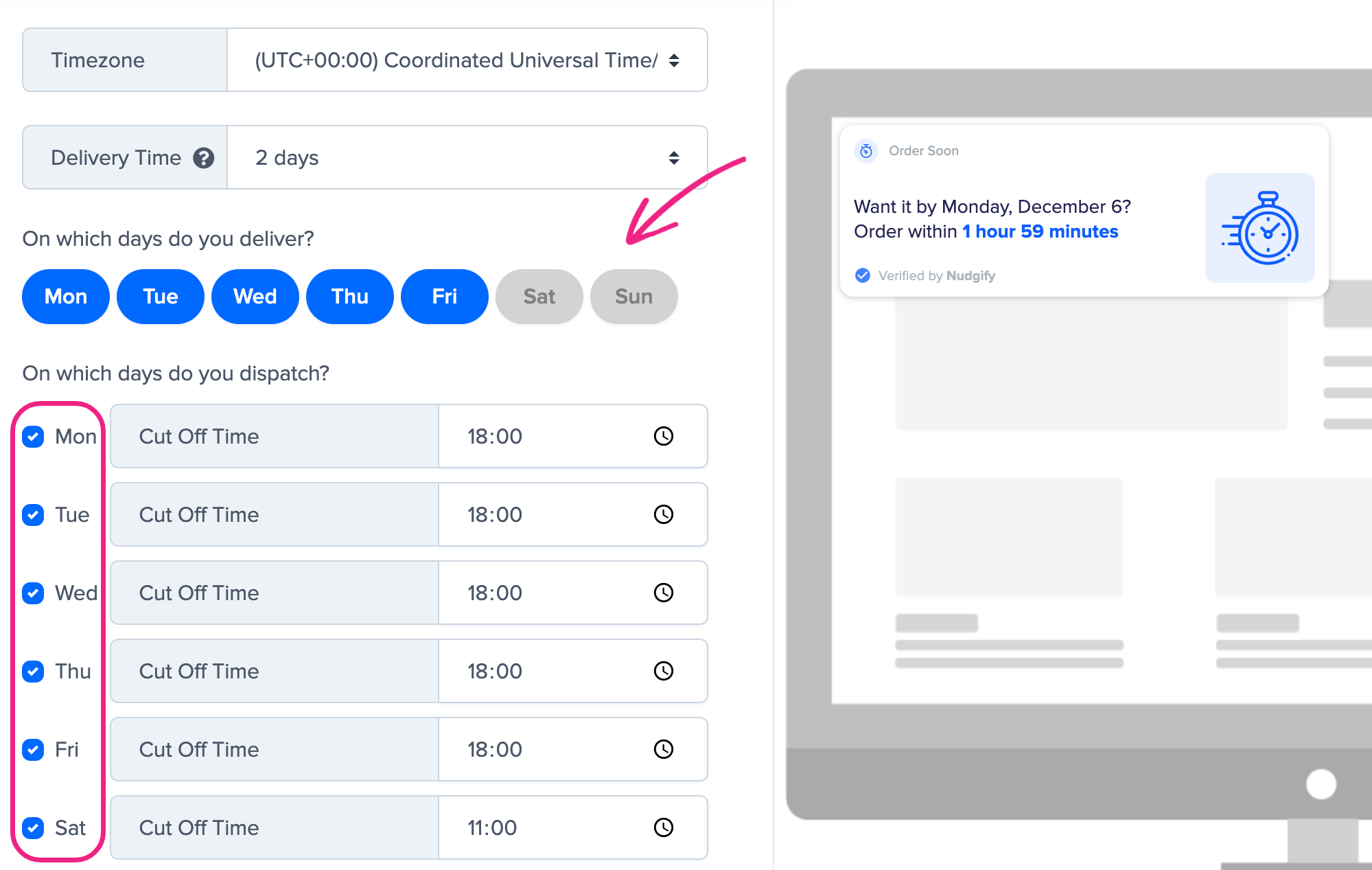
Create Urgency With An Order Deadline That Matches Your Shipping Conditions
The Order Soon Nudge allows you to set an order deadline for delivery by a certain date. Up until now, we assumed that you would deliver and dispatch on all days of the week. It was not possible to for example exclude weekends.
Boost Your Conversion Instantly with Nudgify: Turn your website visitors into customers with real-time Social Proof and FOMO Nudges. Get Started Now →
Now, you can specify exactly on which days and what times you dispatch and deliver when you set up your Order Soon Nudge.
Specify Which Days You Ship – And Which Days You Don’t
The improved Order Soon Nudge gives Nudgify users the option of set their delivery conditions per day.
With the new settings, you can:
- choose how long delivery of your products takes
- select on which days of the week you deliver and on which days you dispatch
- specify different cut-off times for each dispatch day, and also specify your time zone (previously, we assumed the cut-off time you entered would be in UTC)
Add an Order Soon Nudge to add Urgency to your website!
How Does The Order Soon Nudge Handle Time Zones?
You enter your time zone and cut-off times on your dispatch days. We recalculate this to always show the correct time to visitors no matter what time zone they are in.
Increase Trust & Sales with Social Proof
Boost trust, engagement, and conversions with Social Proof — tailored for any industry and easy to integrate. Seamlessly manage client access with our team portal.

Example:
Say you live in Chicago. When you add the Order Soon Nudge, you select Central Time (UTC-6) and set the order deadline to 17:00 for next day delivery.
When someone in Los Angeles sees the Nudge at 13:00 Pacific Time (UTC-8), Nudgify knows that 17:00 in Chicago is 15:00 in Los Angeles. The Nudge will account for this and display “Want it by tomorrow? Order within: 2 hours”.
What about Daylight Savings?
The Order Soon Nudge automatically handles Daylight Savings for you. Nudgify knows which time zones have Daylight Savings and when they start and end. Nudgify will automatically adjust the calculations and Nudge message accordingly.
Read more about the Order Soon Nudge in our updated guide.

